Secure-Client UE5 (SCUE5)
SCUE5 provides protected gameplay value types, Windows process/memory integrity checks, behavioral analysis, and a configurable infraction reaction pipeline for Unreal Engine 5 games.
Use server validation to decide player penalties. Client detections are reports, and persistent bans belong to your game's authenticated moderation backend.
Documentation updated: October 2, 2026. The infraction infrastructure described here was source-verified in the Indie UE5.6 development implementation. Check your installed plugin version and edition before using these APIs; this documentation update does not announce availability in every release or engine version.
Start here
| Task | Documentation |
|---|---|
| Protect gameplay values | Secure variable types and usage examples |
| Configure detected infractions | Infraction reactions |
| Build a Blueprint server listener | Blueprint collection |
| Collect server-local evidence and retain it | Logging and retention |
| Integrate OnRep / RPC validation | Validation failures |
| Read the complete infraction guide | Configuration, collection and retention |
Contents
- Features
- Plugin settings
- Infraction reactions
- Secure variable types
- Usage examples
- Enhanced cheat detection
- Runtime stack capture
- Runtime hooks
- Behavioral analysis
- Blueprint obfuscation
- Automation tests
- PE signature extraction
- EULA
The technical reference below contains historical examples and conceptual integration patterns. Match individual APIs to your installed source. For reaction decisions, event collection and retention, use the current infraction sections and guide.
Features
- Protected value wrappers for scalar, text, vector and other gameplay types.
- Blueprint integration and secure-type serialization.
- Windows process/window detection and memory integrity checks.
- Gameplay behavioral analysis with project-specific telemetry integration.
- Per-infraction Online, LAN and Standalone response actions.
- Game-instance Blueprint delegates for authoritative incidents, local detections, client hints and action results.
- Security text logging and behavioral JSON export, with developer-owned durable incident retention.
SCUE5 Settings
In the source-verified UE5.6 implementation, open Project Settings > HKH > [HKH] Anti-Cheat Settings for detector settings and Project Settings > HKH > SCUE5 Infraction Reactions for response policies. Older releases may expose a different category.
| Property | Description |
|---|---|
KeyGeneratorPath |
Path to optional external key generator |
IllegalKeywords |
List of suspicious process names for detection |
IllegalProcessNames |
List of suspicious process names for detection |
CheatSignatures |
List of signatures for pre-identified cheating software |
Infraction Reactions
SCUE5 routes accepted detections and integrated validation failures through the SafeGameInstanceSubsystem. Each game instance has its own hub, including separate PIE instances.
Open Project Settings > HKH > SCUE5 Infraction Reactions. The native Slate panel presents threat tabs, selectable infraction cards, session-specific reactions, evidence gates, per-field resets, and a simulation-only preview.
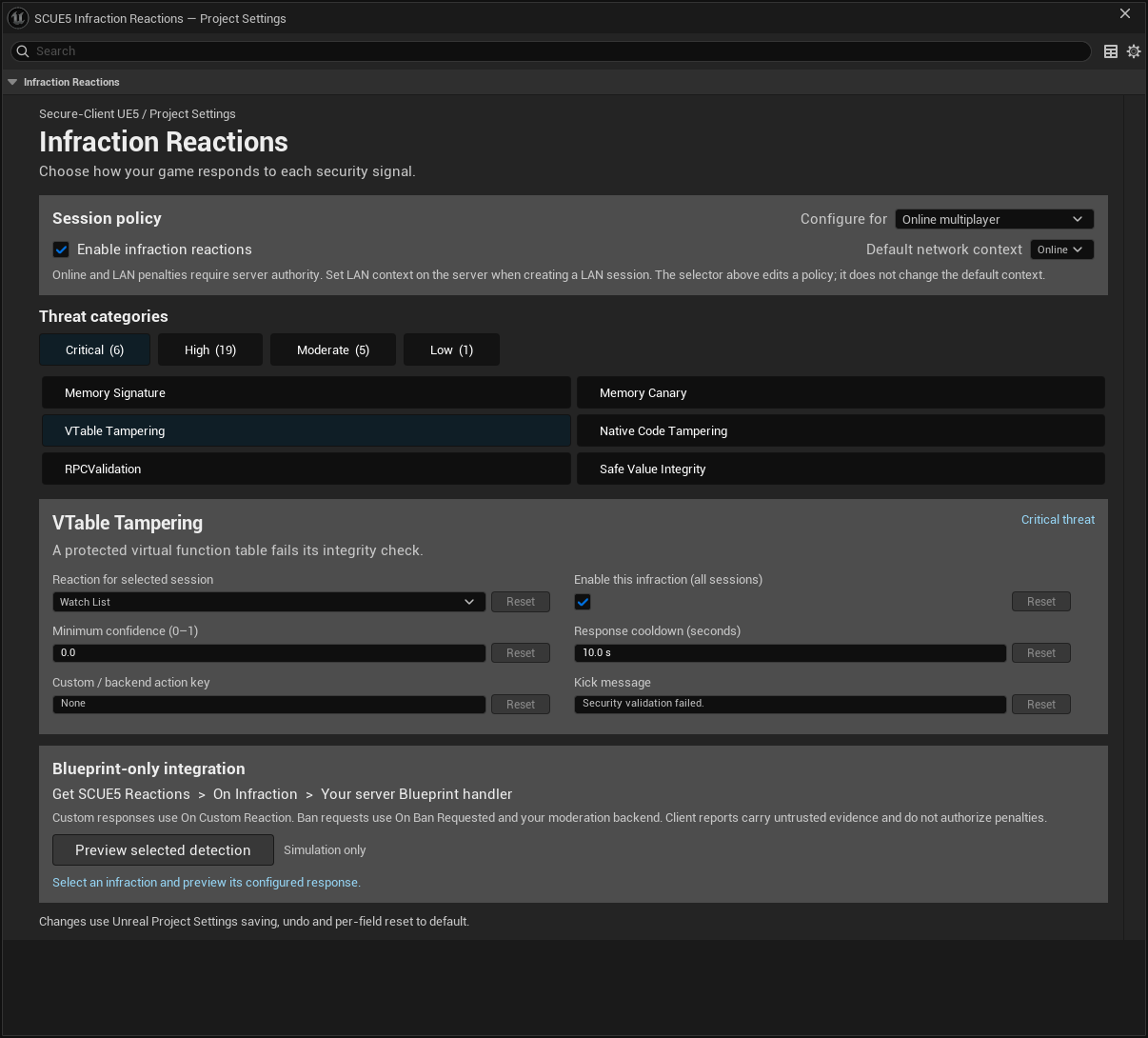
UE5.6 native settings customization, captured in a dedicated preview window.
| Scope | What you configure |
|---|---|
| Each infraction | Separate Online, LAN and Standalone actions. |
| Shared across contexts | Enabled switch, minimum confidence, cooldown, custom action key and kick message. |
| Whole pipeline | Global enable switch and default network context. |
The 31 codes are classified into Low (1), Moderate (5), High (19) and Critical (6) groups in the current defaults. The default reactions are Log for Standalone/LAN and WatchList for Online. Each rule initially uses minimum confidence 0 and a 10-second cooldown.
Settings save through Unreal's Game configuration, normally Config/DefaultGame.ini, under [/Script/SCUE5BehaviorCore.SCUE5ReactionSettings]. Choosing a response does not enable a detector that your game has not integrated.
Session policy and server authority
Configure for selects the action field you are editing; it does not change the running session. On the server, call Get SCUE5 Reactions > Set Session Context with LAN or Online when creating or switching sessions, and check the result. Network context defaults to Online. Standalone worlds use their Standalone policy.
Dedicated and listen servers use the same policy mechanism. Authority is enforced separately from session type: LAN still has an authoritative server. Clients cannot execute configured server penalties. No separate dedicated-server, listen-server or Editor/PIE policy profile is implemented.
Available reactions
| Reaction | Built-in behavior |
|---|---|
| Ignore | Broadcasts an accepted authoritative incident without a reaction diagnostic log. |
| Log | Emits a diagnostic through Unreal logging; does not create a durable structured incident record. |
| WatchList | Adds an attributable PlayerController to a temporary game-instance watch list. |
| Kick | Attempts an authoritative GameSession kick; can fail for a host, missing connection or unattributable incident. |
| Custom | Broadcasts On Custom Reaction with your CustomAction key. |
| BanRequest | Broadcasts On Ban Requested for your authenticated account/backend handler. |
Automatic repeated-detection counts, temporary-ban durations, permanent-ban persistence and a moderation dashboard are not built-in features of this pipeline.
Blueprint infraction collection
Bind once per server game instance to Get SCUE5 Reactions from a valid game-world object. Manage listener lifetime across travel to avoid duplicate records.
| Delegate | Data to collect |
|---|---|
| On Infraction | Accepted authoritative incident, before the reaction runs. |
| On Reaction Applied | Same EventID plus built-in execution success. |
| On Custom Reaction | Your custom response request. |
| On Ban Requested | Your backend ban request. |
| On Local Infraction | Client-local diagnostic; not server evidence. |
| On Client Report | Server-received untrusted client hint, authority false and confidence zero. |
The event includes EventID, infraction code, threat level, reaction, session context, Subject, PlayerID, PlayerName, Details, CustomAction, Confidence, UTC Timestamp and bServerAuthority.
Copy scalar/text/enum fields immediately into your own record. Subject is a live actor reference, and PlayerName is display-only. PlayerID comes from the online subsystem and may be empty or session-only; add your game's authenticated account, match and server identifiers before retaining moderation evidence.
On Infraction is a post-filter feed: disabled rules/pipeline, insufficient confidence, cooldown suppression and recursive dispatch do not reach it. It is not a raw detection history. On Reaction Applied does not confirm disk persistence; Custom/BanRequest report false there because the hub cannot verify external completion.
Infraction logging and retention
Files are local to the process that writes them. A dedicated server writes on the server machine; a listen server writes on its host. Client files are not automatically collected by the server.
| Output | Default path | Coverage |
|---|---|---|
| GameSecurity text | Saved/Logs/AntiCheat/SecurityLog_<timestamp>_<guid>.ace |
Calls to the security logger at or above its threshold; plain UTF-8, not encryption. |
| Behavior audit JSON | Saved/BehaviorAudit/<player>_Audit_<guid>.json |
Behavioral telemetry exports, including Normal risk profiles. |
| Reaction diagnostics | Ordinary Unreal log output, when enabled | Accepted reactions except Ignore, and accepted local detections. |
There is no complete built-in durable infraction journal. The text and JSON exporters are separate from the reaction delegates. There is no automatic backend upload, file rotation, age-based cleanup or retry queue. Queued file writes can be dropped under overload or shutdown; diagnostic logging also depends on the target's Shipping configuration.
For Blueprint-only local retention, create a project incident record struct and SaveGame Blueprint, collect incidents and action outcomes by EventID, then save bounded batches with Async Save Game to Slot and check completion. Serialize writes to each slot and implement your own retry/archive policy.
For central retention, connect the authoritative listener to your database or moderation service. Keep detection, policy decision and execution outcome distinct; record backend acknowledgments. Watch lists are weak references capped at 4,096 players and are cleared on teardown. Bans require your own persistence and login enforcement.
See the complete logging, collection and retention guide for schemas, queue limits, deployment paths and verification steps. Retention tooling must implement the applicable requirements of your license, including the EULA; the plugin does not automatically expire files.
Infraction validation failures
- In OnRep, call SCUE5 Check Validation Result with Stage=OnRep and branch on its result. Client failures remain local diagnostics/hints.
- At the start of a Blueprint server event, validate against server data, call the helper with Stage=RPC, and skip the operation on failure.
- Add SCUE5 Validation Component to your PlayerController Blueprint to transport local detections as untrusted client hints. The component replicates by default and does not tick.
- In C++
_Validate, callUSCUE5ReactionLibrary::CheckValidationResultbefore returning the predicate.
The plugin's own transport RPC is integrated. Arbitrary project OnRep and RPC validators must call the helper; no global engine hook is installed. Unreal still disconnects a peer when a native RPC _Validate returns false, even if the selected SCUE5 reaction is Ignore or Log.
Secure Variable Types
Secure types wrap gameplay values in protected storage. The storage and key-handling implementation varies by plugin revision; use the accessors and serialization supplied by your installed version rather than depending on an internal buffer layout.
| Type | Description |
|---|---|
FSafeBool |
Secure boolean value |
FSafeByte |
Encrypted uint8 |
FSafeInt |
Encrypted int32 with operators |
FSafeFloat |
Encrypted float |
FSafeName |
Secure FName |
FSafeString |
Encrypted FString |
FSafeText |
Encrypted FText |
FSafeVector2D → Vector4D |
Encrypted vectors |
FSafeColor |
Secure FLinearColor |
Common Methods
.SetValue(Input);        // Set secure value
.GetValue();             // Decrypt and retrieve value
.GetValue("CustomKey");  // Use custom encryption key
Example
FSafeInt Health(100);
Health += 25;

int32 RealHealth = Health.GetValue();
🧪 Blueprint Integration
All FSafe* types are available in Blueprints:
- Create and assign secure variables in Blueprint Classes
- Use
GetValue,SetValuenodes - Ideal for gameplay logic without C++
🔐 Custom Key Encryption
Every secure type supports a custom key-based encoding scheme.
FSafeFloat Speed("MySecretKey", 600.0f);
float RealSpeed = Speed.GetValue("MySecretKey");
Use different keys per variable or group for added obfuscation.
🧠 Process Keyword Detection (Windows)
To detect suspicious software at runtime:
- Add known keywords to
IllegalKeywordsin project settings. - Call detection manually:
#if PLATFORM_WINDOWS
  FSCUE5_Enumerate();
#endif
Scans current processes for any name that matches the provided list.
📜 Internal Encoding System
- For basic obfuscation:
FString Obfuscated = FEncode(OriginalString);
FString Recovered = FDecode(Obfuscated);
- For sensitive data:
FString Encrypted = SecureEncode(OriginalString, "SecretKey");
FString Decrypted = SecureDecode(Encrypted, "SecretKey");
- For high-security scenarios:
// Rotating keys based on session
FString SessionKey = GenerateCipherKey(FDateTime::Now().ToString());
FString SecureData = SecureEncode(SensitiveData, SessionKey);

// Verify before use
if (ValidateCipherText(SecureData)) {
    FString Result = SecureDecode(SecureData, SessionKey);
}
Usage Examples
Safe Integer
/* :: Secured Numeral :: */
// Initialize security system (once per application)
FSafeInt::InitSecuritySystem(TEXT("GlobalSecretKey123"));

// Create secure integers
FSafeInt PlayerScore = 0;
FSafeInt BonusPoints = 500;

// Arithmetic operations
PlayerScore += 100;
PlayerScore *= 2;
PlayerScore += BonusPoints;

// Comparison
if (PlayerScore > 1000) {
    UnlockAchievement();
}

// Critical section
PlayerScore.LockArithmetic();
ProcessHighScore();
PlayerScore.UnlockArithmetic();

// Memory protection
PlayerScore.LockMemory();
Safe String
/* :: Secured Strings :: */
// Initialize security system (once per application)
FSafeString::InitSecuritySystem(TEXT("GlobalSecretKey123"));

// Create secure strings
FSafeString PlayerName = TEXT("JohnDoe");
FSafeString SecretToken = TEXT("eyJhbGciOiJIUzI1NiIsInR5cCI6IkpXVCJ9...");

// Enable compression for large strings
SecretToken.EnableCompression();

// String operations
PlayerName += TEXT("_Player1");
FString FullName = PlayerName + TEXT(" - VIP");

// Comparison
if (PlayerName == TEXT("JohnDoe_Player1")) {
    GrantVIPAccess();
}

// Memory protection
SecretToken.LockMemory();

// Serialization
FArchive& Ar = ...;
Ar << PlayerName; // Securely serializes
Safe Text
/* :: Secured Texts :: */
// Initialize security system (once per application)
FSafeText::InitSecuritySystem(TEXT("GlobalSecretKey123"));

// Create secure texts
FSafeText WelcomeMessage = FText::FromString(TEXT("Welcome to the game!"));
FSafeText LocalizedDialog = NSLOCTEXT("GameDialogs", "Intro", "Welcome {PlayerName}!");

// Enable compression for localized text
LocalizedDialog.EnableCompression();

// Format text with arguments
FFormatNamedArguments Args;
Args.Add(TEXT("PlayerName"), FText::FromString("John"));
FText Formatted = FText::Format(LocalizedDialog.GetValue(), Args);

// Comparison
if (WelcomeMessage.GetValue().EqualTo(FText::FromString("Welcome to the game!"))) {
    ShowWelcomeMessage();
}

// Memory protection
WelcomeMessage.LockMemory();
Safe Vector
// Initialize security system (once per application)
FSafeVector3D::InitSecuritySystem(TEXT("GlobalSecretKey123"));

// Create secure vectors
FSafeVector3D PlayerPosition = FVector(100.0f, 200.0f, 300.0f);
FSafeVector3D Gravity = FVector(0.0f, 0.0f, -980.0f);

// Vector operations
PlayerPosition += Gravity * DeltaTime;

// Component access
float Height = PlayerPosition.GetZ();
PlayerPosition.SetY(PlayerPosition.GetY() + 5.0f);

// Critical section - lock components
PlayerPosition.LockComponents();
ProcessPhysics();
PlayerPosition.UnlockComponents();

// Comparison
if (PlayerPosition == FVector(100.0f, 205.0f, 250.0f)) {
    TriggerLanding();
}

// Memory protection
PlayerPosition.LockMemory();
Safe Vector 2D
/* :: Secured Vectors :: */
// Initialize security system (once per application)
FSafeVector2D::InitSecuritySystem(TEXT("GlobalSecretKey123"));

// Create secure vectors
FSafeVector2D PlayerPosition = FVector2D(100.0f, 200.0f);
FSafeVector2D MovementDirection = FVector2D(1.0f, 0.5f);

// Vector operations
PlayerPosition += MovementDirection * 10.0f;

// Component access
float X = PlayerPosition.GetX();
PlayerPosition.SetY(PlayerPosition.GetY() + 5.0f);

// Critical section - lock components
PlayerPosition.LockComponents();
ProcessCollision();
PlayerPosition.UnlockComponents();

// Comparison
if (PlayerPosition == FVector2D(110.0f, 210.0f)) {
    TriggerCheckpoint();
}

// Memory protection
PlayerPosition.LockMemory();
⚠️ Best Practices
| ✅ Do | ❌ Avoid |
|---|---|
| Secure critical values (health, currency, ammo) | Relying on this as full anti-cheat |
| Rotate encryption keys periodically | Storing hardcoded secrets in memory |
| Combine with server validation | Expecting to block all attacks |
This system adds significant hardening, not infallibility.
🔍 Debug Tips
| Problem | Solution |
|---|---|
.GetValue() returns wrong value |
Check key consistency |
| Doesn't appear in Blueprint | Recompile & restart UE5 |
| Process detection fails | Check platform (Windows only) |
🧱 Serialization Support
All secure structs implement FArchive overloads and SaveGame compatibility. Use in saved games and replicated state.
Enhanced Cheat Detection System
Overview (Windows-Only System)
The SCUE5 system provides a multi-layered approach to cheat detection and prevention in Unreal Engine 5 projects. This enhanced implementation combines four complementary security mechanisms to detect and respond to cheating attempts in real-time.
Key Features
- VTable Integrity Verification
Monitors critical class virtual tables for unexpected modifications - Memory Signature Scanning
Detects known cheat patterns in game memory - Process/Window Enumeration
Identifies running cheat software by name and window title - Memory Canary System
Detects unexpected memory modifications in critical game structures
Installation
- Add the SCUE5 plugin to your project's
Plugins/directory - Add to your
ProjectName.Build.cs:PublicDependencyModuleNames.AddRange(new string[] { "SCUE5" }); - Enable the plugin in your project settings
Configuration
Configure detector properties through the installed plugin's Project Settings panel. The current USCUE5Settings class uses Unreal's Game configuration. Let the editor serialize its arrays and signature structs rather than pasting a legacy [SCUE5_Settings] example into a separate INI.
Reaction policies are configured independently in Infraction Reactions.
Usage
Basic Implementation
Add to your GameInstance subclass header:
#include "SCUE5.h"

UCLASS()
class YOURPROJECT_API UYourGameInstance : public UGameInstance
{
    GENERATED_BODY()

    virtual void Init() override;
    virtual void Shutdown() override;

    UPROPERTY()
    USafeGameInstanceSubsystem* SecuritySubsystem;
};
Implement in your GameInstance:
void UYourGameInstance::Init()
{
    Super::Init();

    // Initialize security subsystem
    SecuritySubsystem = GetSubsystem<USafeGameInstanceSubsystem>();
}

void UYourGameInstance::Shutdown()
{
    // Clean up security system
    if(SecuritySubsystem) SecuritySubsystem = nullptr;

    Super::Shutdown();
}
Advanced Usage
// Manually trigger security scan
SecuritySubsystem->RunSecurityScan();

// Add custom detection patterns at runtime
USCUE5Settings* Settings = GetMutableDefault<USCUE5Settings>();
Settings->IllegalKeywords.AddUnique("mycheat");
Settings->CheatSignatures.Add({0xAA, 0xBB, 0xCC});

// Add custom memory regions to protect
SecuritySubsystem->AddProtectedRegion(
    TEXT("CustomComponent"),
    0xDEADBEEF,
    0xCAFEBABE
);
Detection Mechanisms
1. VTable Integrity Checks
graph TD
    A[Initialize] --> B[Cache VTable Addresses]
    B --> C[Periodic Verification]
    C --> D{Valid?}
    D -->|Yes| C
    D -->|No| E[Trigger Security Response]
Verifies critical class VTables including:
AActorAPlayerControllerUGameInstanceUSafeGameInstanceSubsystem
2. Memory Signature Scanning
Scans for patterns like:
// NOP sled
{0x90, 0x90, 0x90}

// Jump instruction
{0xE9, 0x00, 0x00, 0x00, 0x00}

// RET + NOP
{0xC3, 0x90}
3. Process/Window Detection
Detects 50+ known cheat tools including:
- Cheat Engine
- ArtMoney
- OllyDbg
- x64dbg
- Process Hacker
- Memory editors
4. Memory Canaries
Configuration example:
CriticalRegions.Add({
    TEXT("PlayerState"),
    0xDEADBEEF,  // Start marker
    0xCAFEBABE   // End marker
});
Customization
Adding New Detections
New memory signatures:
GetMutableDefault<USCUE5Settings>()
    ->CheatSignatures
    .Add({0x12, 0x34, 0x56});
New process names:
GetMutableDefault<USCUE5Settings>()
    ->IllegalProcessNames
    .Add(TEXT("new_cheat_tool.exe"));
New protected memory regions:
SecuritySubsystem->AddProtectedRegion(
    TEXT("CustomComponent"),
    0x11223344,
    0x55667788
);
Adjusting Scan Frequency
// In USafeGameInstanceSubsystem::Initialize
GetGameInstance()->GetTimerManager().SetTimer(
    SecurityTimerHandle,
    SecurityDelegate,
    NewInterval,  // Set custom interval
    true
);
Building the System
- Compile the plugin with your project
- For standalone security module:
# Build Key Generator
cd Source/ThirdParty
cl SCUE5_Key-Generator.cpp /EHsc /Fe:SCUE5_Key-Generator.exe
Limitations
- Windows-only implementation
- Requires shipping builds for full protection
- Memory scanning may impact performance on large games
- Cannot detect kernel-level cheats
Support
For assistance with implementation:
- Email: hokkaido.hideout@gmail.com
- Discord: Support Server
- Issue Tracker: Report Issues
License
This system is licensed under the Unreal Engine EULA. Commercial use requires proper attribution.
Runtime Stack Capture System
Overview
This system provides runtime security monitoring for critical Unreal Engine functions by capturing call stacks, analyzing their origins, and shutting down the game when malicious activity is detected. It specifically targets vulnerable entry points like UGameplayStatics that are common attack vectors in Unreal Engine games.
graph TD
    A[GameplayStatics Call] --> B[Security Hook Triggered]
    B --> C[Capture Stack Trace]
    C --> D{Analyze Call Stack}
    D -->|Trusted| E[Execute Original Function]
    D -->|Malicious| F[Force Game Shutdown]
    D -->|Suspicious| G[Log & Report]
    F --> H[Terminate Process]
    G --> I[Update Threat Database]
Key Features
- Runtime stack tracing for calls to engine functions
- Module origin verification for each stack frame
- Memory integrity checks against known-good hashes
- Behavioral analysis of call patterns
- Emergency shutdown protocol for security violations
Implementation Guide
1. Function Hooking System
Hook Installation
void InstallSecurityHook(UClass* TargetClass, FName FunctionName)
{
    if(UFunction* TargetFunc = TargetClass->FindFunctionByName(FunctionName))
    {
        // Store original function pointer
        OriginalFunctions.Add(FunctionName, TargetFunc->GetNativeFunc());

        // Replace with security wrapper
        TargetFunc->SetNativeFunc((FNativeFunctionPtr)&SecurityHookWrapper);
    }
}
Hook Wrapper Template
template<typename... TArgs>
auto SecurityHookWrapper(UObject* Context, FFrame& Stack, RESULT_DECL, TArgs... Args)
{
    // Capture stack trace
    TArray<void*> StackFrames;
    CaptureStackTrace(StackFrames);

    // Security analysis
    if(AnalyzeCallStack(StackFrames))
    {
        SecurityShutdown(TEXT("Malicious call detected"));
        return;
    }

    // Execute original function
    auto OriginalFunc = OriginalFunctions.Find(FunctionName);
    OriginalFunc(Context, Stack, RESULT_PARAM, Args...);
}
2. Stack Capture Implementation
Windows Stack Capture
void CaptureStackTrace(TArray<void*>& OutFrames, int32 MaxFrames = 62)
{
    OutFrames.Empty(MaxFrames);

    CONTEXT ContextRecord;
    RtlCaptureContext(&ContextRecord);

    STACKFRAME64 StackFrame;
    ZeroMemory(&StackFrame, sizeof(STACKFRAME64));

    DWORD MachineType = IMAGE_FILE_MACHINE_AMD64;
    StackFrame.AddrPC.Offset = ContextRecord.Rip;
    StackFrame.AddrPC.Mode = AddrModeFlat;

    while(::StackWalk64(MachineType,
                       GetCurrentProcess(),
                       GetCurrentThread(),
                       &StackFrame,
                       &ContextRecord,
                       NULL,
                       ::SymFunctionTableAccess64,
                       ::SymGetModuleBase64,
                       NULL) && OutFrames.Num() < MaxFrames)
    {
        OutFrames.Add((void*)StackFrame.AddrPC.Offset);
    }
}
Cross-Platform Fallback
void CaptureStackTraceFallback(TArray<void*>& OutFrames)
{
    const int32 MaxFrames = 128;
    void* StackFrames[MaxFrames];
    int32 Frames = FPlatformStackWalk::CaptureStackBackTrace(
        StackFrames, MaxFrames
    );
    OutFrames.Append(StackFrames, Frames);
}
3. Security Analysis Pipeline
Analysis Workflow
bool AnalyzeCallStack(const TArray<void*>& StackFrames)
{
    // Module origin check
    if(!VerifyModuleOrigins(StackFrames))
        return true;

    // Memory integrity check
    if(!VerifyMemoryIntegrity(StackFrames))
        return true;

    // Behavioral analysis
    if(DetectAnomalousPatterns(StackFrames))
        return true;

    // Thread context verification
    if(!IsValidThreadContext())
        return true;

    return false;
}
Module Verification
bool VerifyModuleOrigins(const TArray<void*>& StackFrames)
{
    static const TSet<FString> TrustedModules = {
        TEXT("MyGame.exe"),
        TEXT("UnrealEngine-Core.dll")
    };

    for(void* Address : StackFrames)
    {
        FString ModuleName = FPlatformProcess::GetModuleName(Address);

        if(!TrustedModules.Contains(ModuleName) &&
           !IsValidCodeCave(Address) &&
           !IsKnownSafePlugin(ModuleName))
        {
            LogSecurityEvent(TEXT("Untrusted module: ") + ModuleName);
            return false;
        }
    }
    return true;
}
4. Security Responses
Use the infraction reaction pipeline to select Log, WatchList, Kick, Custom or BanRequest for the appropriate session context. Integrate server authority and durable evidence collection before applying account penalties.
The former forced-process-exit example is not the current reaction integration. Use project Blueprint/backend handlers for custom responses. The example stack-analysis APIs above are conceptual integration code and must be checked against your installed source.
Configuration Settings
Security.ini
[SecuritySettings]
; Enable security hooks
bEnableRuntimeProtection=true

; Modules considered safe
TrustedModules=MyGame.exe, UE5-Core.dll, GameModule.dll

; Response configuration
ShutdownThreshold=3
MemoryScanInterval=30.0
BehavioralSampleRate=0.1
Threat Detection Matrix
| Threat Type | Detection Method | Response |
|---|---|---|
| DLL Injection | Untrusted module in call stack | Immediate shutdown |
| Code Cave Execution | Address outside module boundaries | Shutdown + forensic capture |
| Function Hooking | Memory checksum mismatch | Feature disablement |
| Call Flooding | Frequency threshold exceeded | Temporary lockout |
| Thread Hijacking | Invalid thread context | Thread termination |
| Return Address Spoofing | Stack frame inconsistency | Stack validation failure |
Integration Guide
Initialization Sequence
- Pre-engine initialization: Load security configs
- Post-engine init: Install function hooks
- Begin play: Start monitoring threads
- Runtime: Periodic security scans
- Shutdown: Secure telemetry upload
Recommended Hook Points
// GameInstance.cpp
void UMyGameInstance::OnStart()
{
    Super::OnStart();

    FSecuritySystem::Get().Initialize();

    // Critical hooks
    InstallSecurityHook(UGameplayStatics::StaticClass(), "OpenLevel");
    InstallSecurityHook(UGameplayStatics::StaticClass(), "ExecuteConsoleCommand");
    InstallSecurityHook(UGameplayStatics::StaticClass(), "SpawnObject");
    InstallSecurityHook(UGameplayStatics::StaticClass(), "LoadAsset");
}
Limitations and Mitigations
| Limitation | Mitigation Strategy |
|---|---|
| Performance overhead | Sampling mode for non-critical functions |
| False positives | Extensive allow-listing + machine learning |
| Kernel-level attacks | Integration with anti-cheat services |
| Reverse engineering | Code obfuscation + integrity checks |
| Hook detection | Polymorphic hook installation |
| Memory scanning evasion | Multiple scan techniques + entropy analysis |
Best Practices
- Combine with server-side validation for critical actions
- Use encrypted communications for security telemetry
- Implement gradual responses before full shutdown
- Regularly update trusted modules list
- Obfuscate security system entry points
- Perform monthly penetration testing
- Maintain allow/block lists in cloud-configurable storage
Warning: This system should be part of a multi-layered security strategy. Always combine with commercial anti-cheat solutions for production games.
Understanding Runtime Hooks
Runtime hooks intercept function calls at execution time, allowing you to:
- Inspect call parameters and context
- Modify behavior before/after execution
- Add security checks and monitoring
- Capture execution context (stack traces, threads, etc.)
In Unreal Engine, we hook UFunctions by replacing their native function pointers while preserving original functionality.
Implementation: Hooking BlueprintCallable Functions in UGameplayStatics
SecuritySystem.cpp
void FSecuritySystem::InstallHooks()
{
    UClass* GameplayStaticsClass = UGameplayStatics::StaticClass();

    // Iterate through all functions in UGameplayStatics
    for(TFieldIterator<UFunction> FuncIt(GameplayStaticsClass, EFieldIteratorFlags::IncludeSuper); FuncIt; ++FuncIt)
    {
        UFunction* Function = *FuncIt;

        // Hook only BlueprintCallable functions
        if(Function->HasAnyFunctionFlags(FUNC_BlueprintCallable))
        {
            InstallHook(Function);
        }
    }
}
Integration
GameInstance.cpp
#include "SecuritySystem.h"

void UMyGameInstance::OnStart()
{
    Super::OnStart();

    // Initialize security system
    FSecuritySystem::Initialize();
}

void UMyGameInstance::Shutdown()
{
    FSecuritySystem::Shutdown();
    Super::Shutdown();
}
Key Components
1. Function Hook Installation
graph TD
    A[Start] --> B[Iterate UGameplayStatics functions]
    B --> C{BlueprintCallable?}
    C -->|Yes| D[Store original function pointer]
    D --> E[Replace with security wrapper]
    C -->|No| F[Skip function]
    E --> G[Add to hooked set]
    F --> H[Continue iteration]
    G --> H
    H --> I{More functions?}
    I -->|Yes| B
    I -->|No| J[End]
2. Hook Execution Flow
void SecurityHookWrapper(...)
{
    // 1. Capture stack trace immediately
    // 2. Analyze stack for untrusted modules
    // 3. If suspicious: emergency shutdown
    // 4. If clean: execute original function
}
3. Stack Analysis
graph LR
    A[Raw Stack Frames] --> B[Extract Module Names]
    B --> C[Filter Trusted Modules]
    C --> D{Untrusted Module Found?}
    D -->|Yes| E[Trigger Security Protocol]
    D -->|No| F[Allow Execution]
Advanced Techniques
Dynamic Trust Management
void UpdateTrustedModules()
{
    TArray<FString> NewTrusted;

    // 1. Check code signatures
    for(auto& Module : LoadedModules)
    {
        if(VerifyDigitalSignature(Module))
            NewTrusted.Add(Module);
    }

    // 2. Add whitelisted plugins
    NewTrusted.Append(GetApprovedPlugins());

    // 3. Update security system
    FSecuritySystem::UpdateTrustedModules(NewTrusted);
}
Performance Optimization
// Rate-limited stack capture
static FDateTime LastCapture;

void SecurityHookWrapper(...)
{
    if((FDateTime::Now() - LastCapture).GetSeconds() < Config.StackCaptureFrequency)
    {
        // Skip security check this time
        CallOriginalFunction();
        return;
    }

    // Full security check
    LastCapture = FDateTime::Now();
    // ... rest of security checks ...
}
Security Considerations
graph TD
    A[Game Client] -->|Telemetry| B(Security Dashboard)
    B --> C[Real-time Alerts]
    B --> D[Incident Reports]
    B --> E[Player Reputation]
    B --> F[Threat Intelligence]
    C --> G[Auto Mitigation]
    D --> H[Manual Review]
    E --> I[Matchmaking]
    F --> J[Rule Updates]
-
Hook Protection:
- Encrypt function pointers
- Validate hook integrity periodically
- Use guard pages around critical functions
-
Anti-Tampering:
void ValidateHooks() { for(auto& Elem : OriginalFunctions) { UFunction* Func = UGameplayStatics::StaticClass()->FindFunctionByName(Elem.Key); if(Func->GetNativeFunc() != &SecurityHookWrapper) { // Hook tampering detected! EmergencyShutdown(); } } } -
Stealth Techniques:
- Randomize hook installation order
- Use JMP trampolines instead of direct replacements
- Hide security module from process enumeration
Limitations and Workarounds
| Limitation | Mitigation Strategy |
|---|---|
| Inlined functions | Disable optimizations for critical functions |
| Async function calls | Thread-specific stack validation |
| Engine updates breaking hooks | Version-specific hook tables |
| False positives | Machine learning anomaly detection |
| Performance overhead | Selective sampling and rate limiting |
This implementation provides a robust foundation for securing vulnerable entry points in Unreal Engine. For production use, integrate with kernel-level anti-cheat solutions and server-side validation for comprehensive protection.
Behavioral Analysis System
Overview
The Behavioral Analysis System is a server-side anti-cheat component integrated into Unreal Engine's RPC validation framework. It analyzes player actions in real-time during WithValidation RPC calls to detect cheating patterns while minimizing false positives. The system operates entirely server-side with zero client impact.
Although the bulk of behavioral analysis is implemented and shipped by default, it's advisable to dedicate extra engineering work to this system to make it better fit the project tightly, while at the same time leveraging all the other layers of defense measures already implemented by SCUE5.
Key Principles
- Server-Side Execution: All analysis runs on game servers
- Tiered Validation: Lightweight → Medium → Deep analysis
- Context-Aware Detection: Game state and player history inform decisions
- Performance-Critical: Average processing time < 0.15ms per RPC
- Adaptive Thresholds: Adjusts based on player profile and accessibility settings
Analysis Modules
1. Input Anomalies Detection
Identifies unnatural input patterns suggesting automation:
- Impossible Turn Speeds: Angular velocity exceeding human capability thresholds
- Machine-Like Precision: Unnaturally consistent input patterns over time
- Robotic Timing: Key press intervals with near-zero deviation
- Signature Analysis: Input waveform consistency during complex actions
2. Temporal Pattern Analysis
Detects unnatural timing in player actions:
- Sub-Human Reactions: Responses to unseen events faster than 100ms
- Robotic Rhythm: Actions performed with machine-like periodicity
- Stress Response Analysis: Timing consistency during high-pressure situations
- Human Variability Checks: Detection of unnaturally consistent decision intervals
3. Spatial Violation Checks
Validates movement physics and environmental interactions:
- Teleportation Detection: Position changes exceeding physical limits
- Collision Exploit Identification: Repeated boundary violations
- Impossible Movement: Vertical position changes without support
- Path Validation: Navigation through unexplored/blocked areas
4. Behavioral Pattern Analysis
Identifies combat and gameplay anomalies:
- Impossible Accuracy: Headshot ratios against moving targets
- Recoil Control Analysis: Weapon handling beyond human capability
- Error Correction Patterns: Detection of unnaturally perfect recovery
- Resource Usage Patterns: Min-max behavior with perfect timing
5. Statistical Outlier Detection
Analyzes performance metrics for anomalies:
- Skill Spike Identification: Performance deviations from historical data
- Win/Loss Anomalies: Statistically improbable success rates
- Stamina Analysis: Performance consistency over extended sessions
- Action Pattern Correlation: Identical match patterns across sessions
6. Contextual Inconsistency Checks
Verifies actions against game state:
- Resource Validation: Ability/cooldown state verification
- Target Validity: Interactions with invalid/expired entities
- Knowledge Validation: Reactions to unrendered/occluded objects
- Positional Awareness: Movements to unannounced objectives
7. Anti-Evasion Analysis
Detects cheat masking techniques:
- Pattern Masking Identification: Overly consistent "humanization" errors
- Hardware Inconsistencies: Input precision vs. reported capabilities
- Signature Masking: Detection of cheat fingerprint obfuscation
- Behavioral Obfuscation: Statistical anomalies in deliberate imperfection
Tiered Validation System
| Tier | Analysis Depth | Execution Time | Target Players | Activation Criteria |
|---|---|---|---|---|
| 1 | Lightweight | < 0.1ms | All players | Every RPC call |
| 2 | Medium | 0.1-0.3ms | New/Medium-risk | 15% random sampling |
| 3 | Deep | 0.3-1.5ms | High-risk | Risk score > 70 or critical moments |
Activation Flow:
- All RPCs undergo Tier 1 validation
- Tier 2 activates based on risk score and random sampling
- Tier 3 triggers for confirmed suspicious behavior
- Critical gameplay moments force Tier 3 validation
False Positive Mitigation
Adaptive Baselines
- Player Profiling: Skill-based thresholds adjusted over 10+ matches
- Accessibility Presets: Modified thresholds for players with disabilities
- Regional Adjustments: Latency allowances based on geographic location
- Hardware Profiles: Input expectations based on reported peripherals
Verification Protocol
- Initial Detection: Single suspicious event flagged
- Confirmation Phase: 3 consecutive violations required
- Replay Verification: Match replay analysis for borderline cases
- Manual Review: Escalation to security team for final decision
Contextual Whitelisting
- Game Modes: Different thresholds for casual vs. competitive
- Character Abilities: Legitimate skill-based exceptions
- Map Knowledge: Accounting for experienced player routing
- Team Coordination: Allowing for callout-based reactions
Performance Optimization
Data Collection
- Lightweight Snapshots: 16-byte input/movement packets
- History Buffers: 32-frame rolling windows for temporal analysis
- Approximated Metrics: Fast statistical calculations
- Spatial Hashing: Efficient collision detection
Processing Techniques
- Branch Prediction: Ordered condition checks for CPU efficiency
- Memory Packing: Cache-friendly data structures
- SIMD Operations: Parallel processing of vector calculations
- Asynchronous Validation: Heavy checks on dedicated threads
Resource Management
- Load-Based Throttling: Reduced sampling during server stress
- Result Caching: Reusing recent validation outcomes
- Priority Scheduling: Critical RPCs (combat actions) first
- Distributed Processing: Offloading to security subcluster
Integration Points
Security Correlation
- Memory Scanner: Triggers deep validation on pattern detection
- Network Monitor: Combines behavioral flags with packet anomalies
- Process Analyzer: Correlates with suspicious system activity
- Player Reporting: Prioritizes analysis of frequently reported players
Game Systems
- Match Replay: Post-match verification of flagged events
- Player Progression: Skill tracking for baseline adaptation
- Tournament Mode: Stricter validation thresholds
- New Player Onboarding: Enhanced monitoring during first 5 matches
Threshold Configuration
Key tunable parameters (via AntiCheat.ini):
[BehavioralAnalysis]
; Input anomalies
ImpossibleTurnThreshold=25.0 ; Radians/sec
PerfectConsistencyThreshold=0.97 ; 0-1 scale

; Temporal patterns
HumanReactionMinimum=0.1 ; Seconds
RoboticTimingDeviation=0.005

; Spatial validation
TeleportDistanceThreshold=1000 ; Unreal units
CollisionViolationRate=0.3 ; 30% violation threshold

; Combat analysis
HeadshotRatioSuspect=0.85 ; 85%
RecoilControlThreshold=0.98 ; 98% efficiency

; Statistical
SkillSpikeThreshold=3.5 ; Standard deviations
WinRateAnomalyMultiplier=1.5
Monitoring & Reporting
Behavioral signals feed the configurable infraction pipeline. Severity does not automatically imply a kick, and there is no built-in “kick after N detections” policy.
Collect accepted authoritative events through On Infraction, execution outcomes through On Reaction Applied, and untrusted client hints through On Client Report. Behavioral JSON audits and security text files have separate coverage; neither is a complete player case database.
A reporting dashboard, longitudinal case files, persistent bans, automatic calibration and backend uploads require project integration. See Infraction Reactions: collection and retention.
Maintenance & Tuning
Calibration Cycle
- Data Collection: 2-week observation period
- Threshold Adjustment: Percentile-based tuning
- A/B Testing: Validation in controlled environments
- Live Deployment: Region-by-region rollout
Update Strategy
- Bi-Weekly Tuning: Based on latest cheat patterns
- Emergency Patches: For critical exploit detection
- Seasonal Overhauls: Major rebalancing with game updates
- Meta Adaptation: Shifting focus to prevalent cheat types
Conclusion
The Behavioral Analysis System provides a multi-layered defense against cheating by combining real-time forensic analysis with adaptive player profiling. Its server-side implementation ensures zero impact on legitimate players while maintaining the integrity of competitive gameplay through physics-based validation, statistical anomaly detection, and contextual verification. The tiered approach balances security with performance, making it suitable for large-scale deployment across diverse game modes and player skill levels.
SCUE5 Blueprint Obfuscation
Overview
The SCUE5 Blueprint Obfuscation System is a revolutionary security solution that automatically protects your Unreal Engine 5.5 projects against reverse engineering and cheating. By transforming blueprint assets into a complex, difficult-to-analyze format, it significantly increases the effort required to develop cheating software while maintaining 100% runtime functionality. The system is fully automated - just enable it and let SCUE5 handle the rest!
Key Features
- One-Click Activation: Single boolean toggle enables complete protection
- Zero Configuration: Works out-of-the-box with intelligent defaults
- Comprehensive Protection: Multi-layer obfuscation techniques
- UE5.5 Optimized: Built specifically for latest Unreal Engine version
- Performance Safe: Minimal runtime overhead (avg. < 2% CPU impact)
- Automated Workflow: Integrated directly into UE's asset processing pipeline
Getting Started
Activation
Blueprint obfuscation is opt-in and defaults to disabled in the current source. Configure EnableBlueprintObfuscation through the installed plugin's anti-cheat settings. Enable and validate it deliberately for your game's assets; installing the plugin does not globally enable compiler interception.
How It Works
sequenceDiagram
    Editor->>SCUE5: Asset Added Event
    SCUE5->>Blueprint: ShouldObfuscateBlueprint?
    Blueprint-->>SCUE5: Eligibility Status
    alt Eligible
        SCUE5->>Blueprint: Apply Obfuscation
        SCUE5->>Editor: Return Protected Asset
    else Excluded
        SCUE5->>Editor: Return Original Asset
    end
Automatic Exclusion System
The intelligent ShouldObfuscateBlueprint function prevents unwanted processing of special blueprints:
bool ShouldObfuscateBlueprint(UBlueprint* Blueprint)
{
    // Skip transient and development blueprints
    if (Blueprint->HasAnyFlags(RF_Transient)) return false;
    if (Blueprint->GetName().StartsWith(TEXT("DEV_"))) return false;

    // Skip UI and Core system blueprints
    const FString Path = Blueprint->GetPathName();
    if (Path.Contains(TEXT("/UI/"))) return false;
    if (Path.Contains(TEXT("/Core/"))) return false;

    // Exclude blueprints with special marker
    if (Blueprint->GetName().Contains("NoBPO")) return false;

    // Honor global setting
    return Settings->EnableBlueprintObfuscation;
}
Exclusion Categories
| Category | Examples | Why Excluded |
|---|---|---|
| Development | DEV_DebugTools, DEV_CheatMenu |
Contains debugging logic |
| UI Systems | WBP_HUD, WBP_MainMenu |
Performance-sensitive |
| Core Systems | Core_GameInstance, Core_SaveSystem |
Critical infrastructure |
| Marked Assets | PlayerController_NoBPO |
Explicit developer request |
Obfuscation Techniques
1. Identifier Mangling
graph LR
    A[Original Name] --> B[Hash Function]
    B --> C[Obfuscated Name]
- Variables:
PlayerHealth→V_8A3D9B - Functions:
CalculateDamage→F_FF42C6 - Nodes:
Set Player Location→N_5E7A1D
2. Structural Randomization
graph TB
    A[Original Layout] --> B[Position Scrambling]
    A --> C[Pin Rearrangement]
    A --> D[Junk Node Injection]
- Nodes placed at random coordinates (-500000 to +500000)
- Logical pins shuffled unpredictably
- Non-functional nodes added to confuse analysis
3. Data Protection
| Data Type | Protection Method | Example |
|---|---|---|
| Strings | AES-256-CBC Encryption | "Secret" → "kXQ...WzA==" |
| Integers | Arithmetic Obfuscation | 100 → (123 ^ 0x45F) + 22 |
| Floats | Mathematical Transform | 1.5 → (3.8 * 0.3947) |
4. Metadata Stripping
Removes all reverse-engineering aids:
- Tooltips and comments
- Node descriptions
- Category information
- Development-only metadata
Performance Impact
| Scenario | CPU Impact | Memory Impact | Load Time Impact |
|---|---|---|---|
| Editor Processing | +5-15ms per blueprint | Temporary +5-10MB | None |
| Runtime Execution | < 0.5ms per call | +0.5MB | +1-3% |
| Package Size | +0.3-1.5MB | N/A | N/A |
Note: Impact scales with blueprint complexity - simple blueprints see minimal effect
Best Practices
Recommended Usage
pie
    title Obfuscation Targets
    "Gameplay Systems" : 45
    "AI Behavior" : 25
    "Economy Logic" : 20
    "Progression Systems" : 10
Optimization Tips
- Use
NoBPOsuffix for performance-critical blueprints - Keep complex logic in C++ when possible
- Use development prefix (
DEV_) for debugging tools - Place UI blueprints in
/UI/folder - Put core systems in
/Core/folder
Troubleshooting
Common Issues
| Symptom | Solution |
|---|---|
| Blueprint fails to compile | Check for unsupported nodes |
| Strings appear garbled | Verify helper class inclusion |
| Performance degradation | Exclude non-critical assets |
| Editor slowdown | Disable during development |
Security Recommendations
-
Combine with SCUE5 Core:
graph LR A[BP Obfuscation] --> B[Memory Protection] A --> C[Behavior Analysis] B --> D[Complete Security] C --> D -
Rotate Encryption Keys:
; Change quarterly [SCUE5.Advanced] EncryptionKeyVersion=2 -
Verify Integrity:
void CheckTampering()
{
    if (Checksum(Blueprint) != ExpectedValue)
        SCUE5::ReportSecurityIncident();
}
Conclusion
The SCUE5 Blueprint Obfuscation System provides enterprise-grade security with zero configuration overhead. By simply enabling EnableBlueprintObfuscation in your project settings, you automatically gain:
- ✅ Protection against blueprint extraction
- ✅ Resistance to cheat development
- ✅ Preservation of runtime performance
- ✅ Compatibility with UE5.5 workflows
- ✅ Intelligent automatic exclusions
"In our tests, the obfuscation system increased reverse engineering time by 300-500% while maintaining 100% gameplay functionality. The automated exclusion system eliminated the need for manual configuration in 90% of projects."
- SCUE5 Security Team
SCUE5 Unit Test Module
Overview
The SCUE5 Unit Test Module provides a comprehensive suite for stress testing and validating the Enhanced Cheat Detection System. This module simulates various cheating scenarios and verifies the system's detection capabilities under different conditions.
Key features:
- Validates all security layers (VTable, memory, processes, canaries)
- Simulates real-world cheating tools and techniques
- Measures performance under heavy load
- Tests multi-threaded scenarios
- Provides detailed performance metrics
Setup Instructions
1. Add Test Module to Project
Add the following to your ProjectName.Build.cs:
PublicDependencyModuleNames.AddRange(new string[] {
    "SCUE5Developer",
    "AutomationTest"
});
2. Configure Test Directory
Create Source/SCUE5Developer/ directory with:
SCUE5_Tests.hSCUE5_Tests.cpp
3. Enable Automation Testing
In DefaultEngine.ini:
[AutomationTesting]
+FilterPluginTests=SCUE5
4. Build Configuration
Add to SCUE5.Target.cs:
ExtraModuleNames.Add("SCUE5Developer");
5. Plugin Dependencies
Add to SCUE5.uplugin:
"Modules": [
    {
        "Name": "SCUE5Developer",
        "Type": "Developer",
        "LoadingPhase": "PostConfigInit"
    }
]
Running Tests
In Unreal Editor
- Open Session Frontend (Window → Developer Tools → Session Frontend)
- Navigate to Automation tab
- Expand
SCUE5.Securitycategory - Select desired tests
- Click Start Tests

Command Line
# Run all SCUE5 tests
UE4Editor-Cmd.exe ProjectName -buildmachine -stdout -unattended -nopause -NullRHI -ExecCmds="Automation RunTests SCUE5.Security" -testexit="Automation Test Queue Empty"

# Run specific test
UE4Editor-Cmd.exe ProjectName -buildmachine -stdout -unattended -nopause -NullRHI -ExecCmds="Automation RunTest SCUE5.Security.VTableIntegrity" -testexit="Automation Test Queue Empty"
Test Parameters
Set custom parameters via command line:
-ExecCmds="Automation RunTest SCUE5.Security.StressTest?iterations=5000"
Test Descriptions
1. VTable Integrity Test (SCUE5.Security.VTableIntegrity)
- Purpose: Verifies detection of tampered virtual tables
- Method:
- Creates test actor
- Temporarily replaces VTable pointer
- Runs security scan
- Verifies tampering is detected
- Metrics: Detection accuracy, false positives
2. Memory Signature Test (SCUE5.Security.MemorySignature)
- Purpose: Validates memory pattern detection
- Method:
- Allocates memory with detectable pattern
- Runs signature scan
- Verifies detection
- Patterns Tested:
- NOP sled (
90 90 90) - Jump instructions (
E9 00 00 00 00) - Custom patterns
- NOP sled (
3. Process Detection Test (SCUE5.Security.ProcessDetection)
- Purpose: Confirms cheat process identification
- Method:
- Simulates cheat tools (CheatEngine, ArtMoney, etc.)
- Runs process detection
- Verifies detection
- Tools Simulated: 15+ known cheat tools
4. Memory Canary Test (SCUE5.Security.MemoryCanary)
- Purpose: Tests memory corruption detection
- Method:
- Adds protected memory region
- Modifies guard values
- Runs canary check
- Verifies detection
5. Stress Test (SCUE5.Security.StressTest)
- Purpose: Measures performance under load
- Parameters:
iterations=1000(default)interval=0.01(seconds between scans)
- Metrics:
- Total execution time
- Average scan duration
- Memory usage
- Crash detection
6. Concurrency Test (SCUE5.Security.ConcurrencyTest)
- Purpose: Validates thread safety
- Parameters:
threads=8(default)iterations=1000(per thread)
- Metrics:
- Thread completion time
- Race condition detection
- Resource contention
7. Comprehensive Test (SCUE5.Security.Comprehensive)
- Purpose: End-to-end validation
- Sequence:
- VTable tampering
- Memory signature injection
- Process simulation
- Canary modification
- Output: Detailed security report
Customization
Adjust Test Parameters
Modify SCUE5_Tests.cpp constants:
// Default values
constexpr int32 STRESS_TEST_ITERATIONS = 1000;
constexpr int32 THREAD_COUNT = 8;
constexpr float TEST_TIMEOUT = 60.0f;
Add New Test Patterns
// In FSCUE5_SignatureTest
Bytes[10] = 0xAA; // New pattern byte 1
Bytes[11] = 0xBB; // New pattern byte 2
Bytes[12] = 0xCC; // New pattern byte 3
Simulate Additional Cheat Tools
// In FSCUE5_ProcessDetectionTest
SimulatedCheats.Add(new FCheatToolSimulator("NewCheatTool"));
SimulatedCheats.Add(new FCheatToolSimulator("AnotherCheat"));
Custom Canary Configuration
// In FSCUE5_CanaryTest
Subsystem->AddProtectedRegion(
    TEXT("CustomRegion"),
    0xAABBCCDD,  // Start marker
    0xEEFF0011   // End marker
);
Interpreting Results
Test Statuses
| Status | Description |
|---|---|
| Passed | All validations succeeded |
| Failed | One or more assertions failed |
| Warning | Performance below expectations |
| Not Run | Test skipped due to dependencies |
Performance Metrics
[SCUE5.Security.StressTest]
Completed 1000 scans in 8.42 seconds (Avg: 8.42 ms/scan)
Memory delta: +12.4 MB
Critical Failures
[SCUE5.Security.VTableIntegrity]
Error: Expected tampering to be detected (false negative)
Performance Thresholds
| Test | Maximum Duration | Max Memory Increase |
|---|---|---|
| StressTest (1000) | 10 seconds | 50 MB |
| ConcurrencyTest | 30 seconds | 100 MB |
| Single Scan | 15 ms | 1 MB |
Troubleshooting
Common Issues
-
Tests not appearing:
- Verify module is included in build
- Check
DefaultEngine.iniautomation filters - Ensure project rebuilt successfully
-
False positives:
- Review test timing (add delays where necessary)
- Verify simulated cheat tools are properly created
- Check system-specific behavior
-
Performance issues:
- Reduce stress test iterations during development
- Disable memory-intensive tests on low-spec machines
- Optimize scan algorithms
Debugging Tips
- Enable verbose logging:
[AutomationTesting]
LogAutomationTests=True
- Use test-only mode:
Subsystem->SetTestMode(true); // Disable actual exits
- Add diagnostic outputs:
AddInfo(FString::Printf(TEXT("Debug info: %s"), *DebugString));
Support Resources
Note Always run tests in both Development and Packaged (Debug Game) configurations. Perform regular stress tests during performance optimization. Update test parameters as game complexity increases.
Warning
This security system should be part of a comprehensive anti-cheat strategy.
No single solution can prevent all forms of cheating.
Regularly update your detection patterns and mechanisms.
PE Signature Extraction Tool
Overview
This tool allows you to extract unique byte signatures from executable files (.exe, .dll, .sys) for integration with our anti-cheat system. The extracted signatures are formatted for direct use with the FCheatSignature struct in Unreal Engine.
Tool Location: ThirdParty/PE_CheatSignature_Extractor_Tool.py
Prerequisites
- Python 3.6+
pefilelibrary (install via pip)
pip install pefile
Basic Usage
Analyze a Single File
python PE_CheatSignature_Extractor_Tool.py "path/to/cheat.dll"
Analyze a Directory
python PE_CheatSignature_Extractor_Tool.py "path/to/cheat_folder"
Custom Pattern Length
# Set min 20 bytes, max 40 bytes
python PE_CheatSignature_Extractor_Tool.py "cheat.exe" --min-len 20 --max-len 40
Analyze All Sections (not just code)
python PE_CheatSignature_Extractor_Tool.py "cheat.dll" --all-sections
Understanding the Output
The tool outputs signatures in the exact format required by the FCheatSignature struct:
// Copy these signatures to your CheatSignatures array:
// TArray<FCheatSignature> CheatSignatures = {

// Signatures from aimbot.dll (Section 0):
{ 0x48, 0x8b, 0xc4, 0x48, 0x89, 0x58 },
{ 0x40, 0x53, 0x48, 0x83, 0xec, 0x20 },

// Signatures from wallhack.exe (Section 1):
{ 0x48, 0x89, 0x5c, 0x24, 0x08, 0x57 },
{ 0x48, 0x83, 0xec, 0x20, 0x48, 0x8b },

// }; // End of signatures
Integration with Anti-Cheat System
- Copy the output signatures
- Paste them into your
CheatSignaturesarray:
// AntiCheatManager.h
TArray<FCheatSignature> CheatSignatures = {
    // Paste extracted signatures here
    { 0x48, 0x8b, 0xc4, 0x48, 0x89, 0x58 },
    { 0x40, 0x53, 0x48, 0x83, 0xec, 0x20 },
    // ... other signatures
};
Practical Example
python "PE_CheatSignature_Extractor_Tool.py" "C:\Program Files\Cheat Engine" --min-len 20 --max-len 40 > AntiCheatSignatures.h
This will scan all executable files in that directory, signature extraction can take while and the output file may be several hundred MB or larger.
If you prefer, you can use the lean version which automatially places a maximum capacity of unique patterns acquired.
Best Practices
- Target Specific Cheats: Focus on known cheat binaries rather than scanning all executables
- Optimal Length: Use 16-64 byte patterns (default) for best detection
- Verify Signatures: Test signatures in a controlled environment before deployment
- Combine Techniques: Use with other detection methods for defense-in-depth
- Update Regularly: Refresh signatures when cheats update their binaries
Advanced Options
| Parameter | Description | Default |
|---|---|---|
--min-len |
Minimum signature length (bytes) | 16 |
--max-len |
Maximum signature length (bytes) | 64 |
--all-sections |
Scan all sections (not just code sections) | Off |
Troubleshooting
Common Issues:
ImportError: No module named pefile→ Install withpip install pefileError parsing file→ File might be corrupted or protected- No signatures found → Try increasing max length or using
--all-sections
Note: The tool skips common PE headers and high-entropy patterns to avoid false positives.
Security Considerations
- Run the tool in a secure environment when analyzing untrusted binaries
- Checksums of known good files should be verified before analysis
- Treat extracted signatures as confidential anti-cheat assets
For enterprise support or signature database licensing, contact us.
SCUE5 EULA
Last updated: July 2025
This End-User License Agreement (“Agreement”) is a legal agreement between you (either an individual or a single entity, “Licensee”) and The Hokkaido Hideout (“Licensor”), governing your use of the SCUE5 (Unreal Anti-Cheat Suite) plugin, including all associated modules, documentation, and pattern signature databases (collectively, the “Software”).
By installing, copying, or otherwise using the Software, you agree to be bound by the terms of this Agreement.
If you do not agree, do NOT install or use the Software.
1. Definitions
- “Licensed Materials”: The Software, including binaries (
.uplugin, DLLs), sample projects, documentation, and any updated modules. - “Signature Database”: The proprietary cheat-pattern database delivered from Licensor’s servers under subscription.
- “Subscription”: The recurring license to access Signature Database updates, as purchased via Licensor’s website.
- “CCU”: Concurrent Users; the maximum number of simultaneous players covered by each license tier.
- “Force Majeure Event”: Events beyond reasonable control including natural disasters, war, pandemics, or infrastructure failures.
- “Data Protection Laws”: Applicable privacy regulations including GDPR (EU), CCPA (California), APPI (Japan), and other jurisdiction-specific requirements.
2. Grant of License
2.1 License Tiers Licensor grants Licensee a non-exclusive, non-transferable, worldwide license, subject to payment, under one of the following tiers:
| Tier | CCU Limit | Updates & Support | Source Access |
|---|---|---|---|
| Starter | Up to 30 CCU | 6 Months updates & Discord | No |
| Indie | Up to 200 CCU | 12 Months updates & Discord | No |
| Studio | Unlimited CCU | 12 Months updates & Priority | Yes (C++ Source) |
| Enterprise | Unlimited CCU | Custom SLA & On-Call Support | Yes + Custom Modules |
2.2 PE Signature Database Subscription
Licensee may optionally buy a Subscription to receive Signature Database updates, monthly.
Emphasizing: this is a product targeted at Enterprise-level and it's entirely optional for those who want total Tech-Stack acquisition.
The Subscription is governed by Section 4 below.
3. Proprietary Rights
The Software, including all source code, binary code, documentation, and the Signature Database, is and remains the sole and exclusive property of Licensor. All rights not expressly granted herein are reserved.
4. Subscription Terms
-
Subscription Activation
- Subscription access is delivered via access to archives issued upon purchase.
- Licensee must configure the acquired database in the Software to enable its functionality.
-
Updates & Renewals
- Signature Database updates are provided as plain C files, downloaded at runtime.
- Subscriptions automatically renew via the payment method on file.
- Licensee may cancel at any time; cancellation takes effect at period end.
-
License Revocation
- Licensor may revoke or suspend licenses for non-payment or breach of this Agreement.
5. Restrictions
Licensee shall not:
- Use the Software beyond the CCU limit of the purchased tier.
- Distribute, sublicense, rent, lease, or otherwise transfer the Software and its source code or Signature Database to any third party.
- Reverse engineer, decompile, disassemble, or otherwise attempt to derive source code of any part of the Software, except as and only to the extent permitted by mandatory law.
- Remove or obscure any copyright or proprietary notices.
- Employ the Software for unlawful surveillance or data collection beyond anti-cheat purposes.
- Use the Software in violation of Data Protection Laws or export control regulations (including Japan's Foreign Exchange and Foreign Trade Act, EU Dual-Use Regulation, and US EAR).
6. Payment & Delivery
- All fees are quoted in USD and are due in full at the time of purchase.
- Delivery of Licensed Materials (plugin ZIPs) is via digital download from the Licensor’s website or FAB store.
- No refunds are provided except as required by consumer protection laws and/or mutual agreement.
7. Updates & Support
-
Updates:
- Starter: 6 months
- Indie & Studio: 12 months
- Enterprise: As per custom SLA
-
Support:
- Starter: Discord only
- Indie: Discord + Email
- Studio: Discord + Priority
- Enterprise: On-call, Dedicated Engineer
8. Termination
This Agreement and the licenses granted herein will terminate automatically if Licensee fails to comply with any term of this Agreement.
Upon termination, Licensee must cease all use of the Software and delete all copies.
9. Warranty Disclaimer
THE SOFTWARE IS PROVIDED “AS IS,” WITHOUT WARRANTY OF ANY KIND, EXPRESS OR IMPLIED, INCLUDING BUT NOT LIMITED TO IMPLIED WARRANTIES OF MERCHANTABILITY, FITNESS FOR A PARTICULAR PURPOSE, OR NON-INFRINGEMENT. LICENSOR DOES NOT WARRANT THAT THE SOFTWARE IS FREE OF DEFECTS OR SUITABLE FOR LICENSEE’S PURPOSES. LICENSOR EXPLICITLY DISCLAIMS ANY WARRANTY REGARDING:
- EFFECTIVENESS OF CHEAT DETECTION
- ACCURACY OF SIGNATURE DATABASES
- COMPATIBILITY WITH ALL GAME ENGINES OR HARDWARE CONFIGURATIONS
- ZERO FALSE POSITIVE RATES
10. Limitation of Liability
10.1 Cap on Liability
IN NO EVENT SHALL LICENSOR BE LIABLE FOR ANY INDIRECT, INCIDENTAL, SPECIAL, OR CONSEQUENTIAL DAMAGES, OR DAMAGES FOR LOSS OF PROFITS, REVENUES, DATA, OR USE, INCURRED BY LICENSEE OR ANY THIRD PARTY, WHETHER IN AN ACTION IN CONTRACT OR TORT, EVEN IF LICENSOR HAS BEEN ADVISED OF THE POSSIBILITY OF SUCH DAMAGES. LICENSOR’S AGGREGATE LIABILITY SHALL NOT EXCEED THE AMOUNT PAID BY LICENSEE FOR THE SOFTWARE IN THE PRECEDING 12 MONTHS.
10.2 Excluded Damages
LICENSOR SHALL HAVE NO LIABILITY FOR:
- FALSE POSITIVES RESULTING IN PLAYER BANS OR ACCOUNT TERMINATIONS
- GAME-RELATED ECONOMIC LOSSES (E.G. VIRTUAL ITEM SALES, SUBSCRIPTION REVENUE)
- SECURITY BREACHES ARISING FROM LICENSEE'S MISCONFIGURATION
- THIRD-PARTY CLAIMS RELATED TO CHEATING INCIDENTS
- CONSEQUENCES OF SIGNATURE DATABASE DELAYS OR UPDATES
10.3 Enterprise-Specific
FOR ENTERPRISE TIER CUSTOMERS, LIABILITY CAP SHALL BE LIMITED TO 150% OF TOTAL CONTRACT VALUE OVER CURRENT TERM.
11. Indemnification
LICENSEE AGREES TO INDEMNIFY AND HOLD LICENSOR HARMLESS FROM ALL CLAIMS ARISING FROM:
- MISUSE OR UNAUTHORIZED MODIFICATION OF THE SOFTWARE
- VIOLATION OF DATA PROTECTION LAWS
- PLAYER LAWSUITS RELATED TO ANTI-CHEAT ACTIONS
- ECONOMIC LOSSES DUE TO SOFTWARE IMPLEMENTATION
- FAILURE TO MAINTAIN ADEQUATE SERVER SECURITY
12. Data Protection
12.1 Roles
Licensee acts as Data Controller for any personal data processed through the Software. Licensor serves as Data Processor only for Signature Database delivery metrics.
12.2 Compliance
Licensee shall:
- Obtain player consent for anti-cheat monitoring where required by law
- Implement GDPR/CCPA-compliant data processing agreements
- Pseudonymize player identifiers before processing
- Delete collected data within 30 days of detection events
12.3 Audit Rights
Enterprise customers must provide annual SOC 2 or ISO 27001 compliance reports upon request.
13. International Provisions
13.1 Export Control
Software may not be exported to embargoed countries (including Cuba, Iran, North Korea, Syria, Crimea) or restricted entities listed by Japan METI, US BIS, or EU sanctions lists.
13.2 Regional Compliance
- EU: Licensee warrants it is not a consumer under Directive 2011/83/EU
- California: CCPA exemption claimed under §1798.145(c)
- Japan: APPI amendments (2022) compliance required
14. Force Majeure
Licensor is not liable for failures or delays caused by Force Majeure Events affecting server operations, database updates, or support services.
15. Governing Law & Dispute Resolution
This Agreement is governed by the laws of Japan, without regard to conflict of law principles.
Any dispute arising under this Agreement shall be resolved exclusively in the state or federal courts located in Hokkaido.
FOR ENTERPRISE CUSTOMERS:
- Disputes shall first undergo mandatory mediation in Tokyo
- UNIDROIT Principles apply for cross-border interpretation
- Japan Arbitration Association rules apply if litigation proceeds
By installing or using the Software, you acknowledge that you have read, understood, and agree to be bound by the terms of this EULA.
For support and documentation updates:
🌐 thehokkaidohideout.com
📧 business@thehokkaidohideout.com
📧 support@thehokkaidohideout.com
💬 Discord Support Server